
Identity proves who you are. FirmBrowser governs what happens next.
A managed browser and secure access orchestration layer that controls the device, hides the password, protects the session and governs what users can do inside cloud applications.
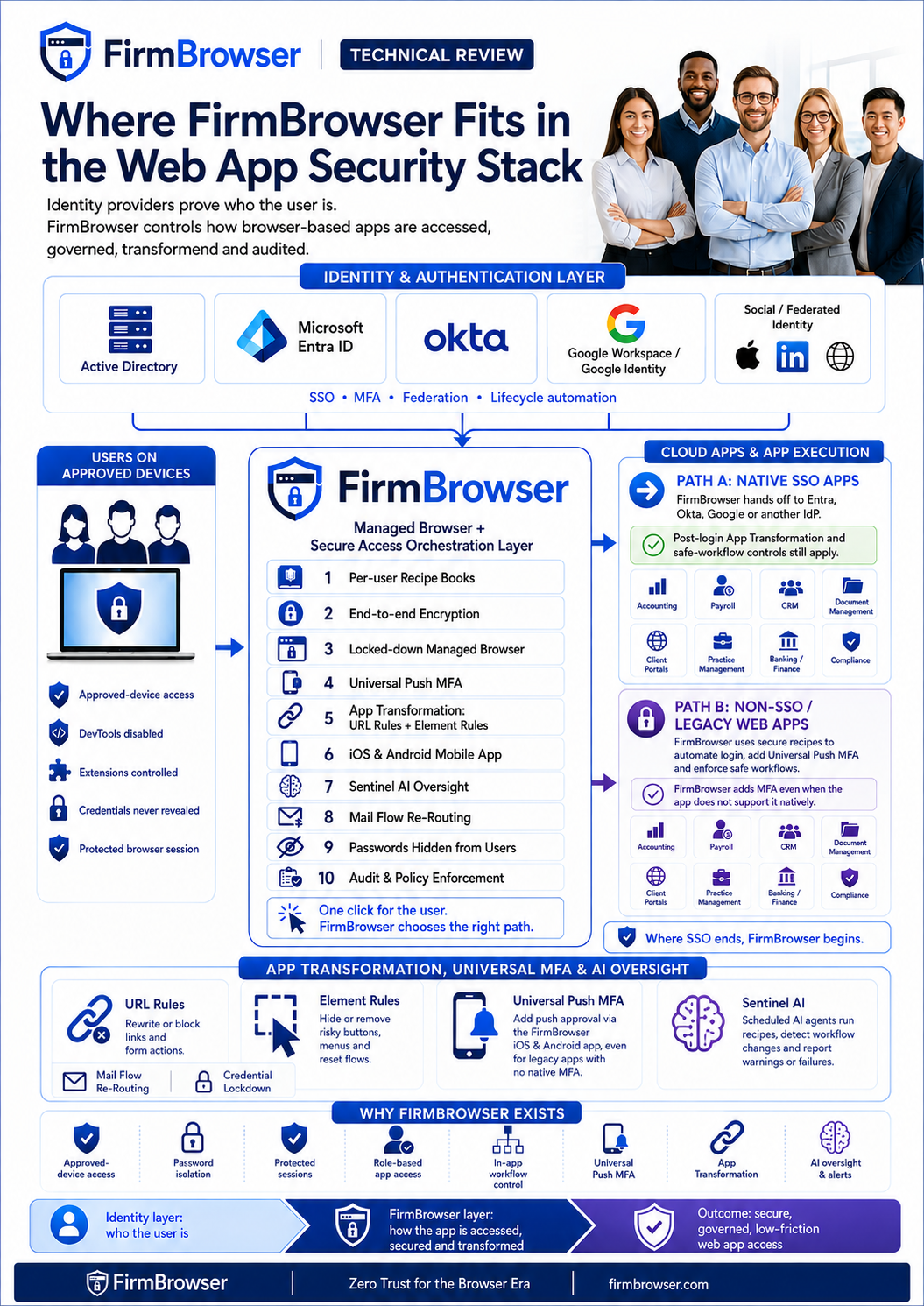
Technical architecture overview — tap or click to view full size.
Who are you?
- Active Directory
- Microsoft Entra ID
- Okta
- Google Workspace / Google Identity
- Other SAML / OIDC providers
- Federated identity services
FirmBrowser is designed to work alongside these identity platforms. Vendor names are shown for architectural context only and do not imply partnership or endorsement.
How may you access and use this app?
Managed Browser + Secure Access Orchestration Layer
- Authentication orchestration
- Password isolation
- Managed browser
- App Transformation
- URL Rules
- Element Rules
- Table Rules
- Credential Lockdown
- Data movement controls
- Audit & session evidence
What can you actually do once inside?
FirmBrowser hands authentication to your approved identity provider, then continues applying browser and post-login controls.
FirmBrowser executes an authorised App Recipe so the user never needs to know, type or store the credential.
A library of pre-built, verified App Recipes
Browse an expanding library of recipes for the applications firms use every day — pre-built, tested and ready to assign in seconds. If an app isn't in the library, we build a recipe for it.
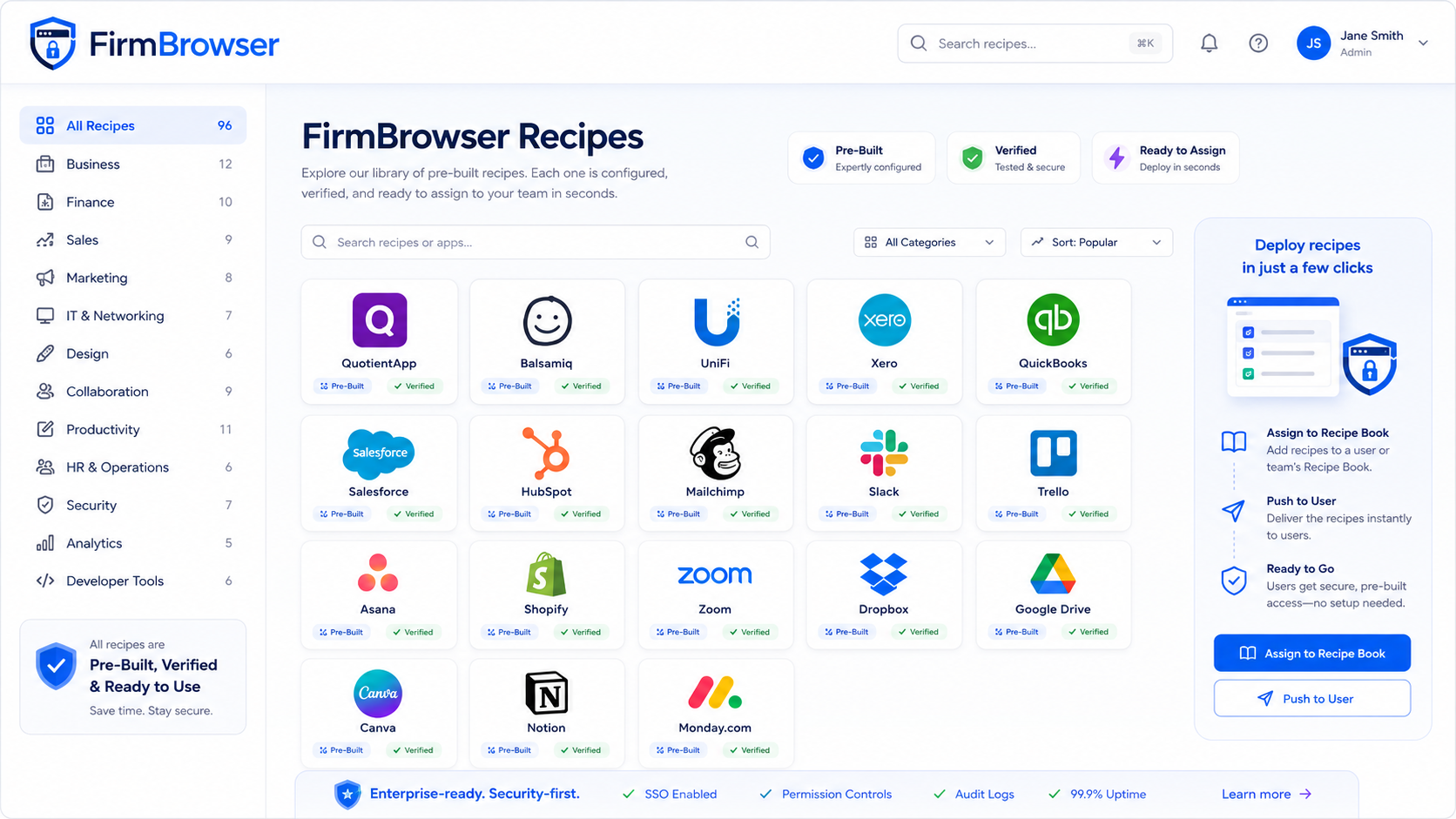
The FirmBrowser Recipe Library — pre-built, verified and ready to assign. Tap or click to view full size.
Any app your firm uses — if it isn't in the library, we can build a recipe for it.
Push MFA for any app.
Traditional MFA depends on the application vendor supporting it. FirmBrowser changes that. Native iOS and Android apps bring a modern push-approval step into FirmBrowser App Recipes — including legacy and specialist web applications with no native MFA capability.
- Add push MFA to applications that never supported it
- One approval experience across every App Recipe
- Configurable per Recipe — including alongside an app's own MFA
Universal Push MFA
Simple. Secure. Passwordless.
Login Request
Approve sign-in to QuotientApp?
- Brisbane, QLD, Australia
- FirmBrowser on Windows
- Today at 9:41 AM
Secured by FirmBrowser
MFA policy that follows the application
Administrators decide which App Recipes require FirmBrowser approval, which follow organisational policy, and which already have strong native authentication.
- Recipe A · Practice ledger FirmBrowser Push MFA every launch
- Recipe B · Document portal MFA according to organisational policy
- Recipe C · Banking platform Strong native authentication — no additional FirmBrowser challenge
- Recipe D · Payroll FirmBrowser MFA + application MFA
A complete post-login transformation ecosystem
Element Rules, URL Rules, Table Rules and AI Intelligence work together to reshape what a cloud application offers a given role — without asking the vendor to change anything.
Element Rules
Hide or remove buttons, menus, settings, exports and links so users see only what their role needs.
URL Rules
Control links and form destinations — block or redirect unauthorised routes and keep sessions inside approved workflows.
Table Rules
Hide columns and rows, apply filters and masking, and drive conditional logic over the data a user can see.
AI Intelligence
Detects the table and interface technology an application uses and auto-adjusts how rules are applied.
| Client | Matter | Fees | Salary | Bank account |
|---|---|---|---|---|
| Aurora Pty Ltd | Tax 2026 | $12,400 | $142,000 | •••• 4821 |
| Belmont Group | Audit | $31,900 | $168,500 | •••• 9042 |
| Carrow Family Trust | Advisory | $8,250 | $96,000 | •••• 1177 |
Every column, every row, every value — visible to everyone with access.
| Client | Matter | Fees | Salary |
|---|---|---|---|
| Aurora Pty Ltd | Tax 2026 | $12,400 | •••••• |
| Belmont Group | Audit | $31,900 | •••••• |
- Column Rule — Bank account removed
- Row Rule — records outside the user's portfolio filtered out
- Masking Rule — Salary values obscured
- Conditional logic — rules vary by role, group and access period
Applications render data in very different ways. FirmBrowser detects the technology in use and adapts its technical response automatically, so Element, URL and Table Rules behave consistently and keep working as applications change.
Identity integration — FirmBrowser complements, it does not replace
FirmBrowser integrates with the identity platforms firms already run — Active Directory, Entra ID, Okta, Google Workspace and other providers. Your identity provider proves who the user is. FirmBrowser controls how browser-based applications are then accessed, used and audited.
Controlled access from approved devices
FirmBrowser helps prevent critical cloud applications being accessed from unmanaged, personal or unauthorised devices. Device posture is evaluated before an application ever opens.
Recipe Books — one per user
Each user receives a personalised Recipe Book containing only the authorised application definitions and policies their role requires. Access is centrally provisioned, centrally changed and centrally removed.
- Role-based application sets
- Central provisioning
- Instant revocation on exit
- No shared credential lists
- Consistent policy per role
App Recipes and password isolation
An App Recipe is far more than a stored username and password: it defines how the app is reached, how authentication is performed, and what the user may do once inside. Each app can carry a unique, complex password that users never see, type, copy or store.
- Automated login
- Unique complex passwords
- No password reuse
- No password sharing
- Reduced reset pressure
- Reduced credential exposure
Automated login saves real time
Users click the application and FirmBrowser handles the login sequence. Across a day of repeated logins, MFA prompts, resets and lockouts, firms can recover a meaningful amount of productive time per user — in some cases over an hour per day.
Universal Push MFA — MFA for applications that never supported it
Native iOS and Android apps provide a consistent push-approval step inside FirmBrowser App Recipes. Where MFA is enabled for a Recipe, FirmBrowser pauses the login, sends a push notification to the enrolled device and continues the automated login once the user taps Approve. MFA is configurable per Recipe, and can sit in front of an application's own authentication without weakening or removing it.
- Push MFA for password-only apps
- Native iOS + Android apps
- Recipe-level MFA policy
- FirmBrowser MFA + application MFA
- No application modification required
- One consistent approval experience
Managed browser — the browser is part of the security boundary
If credentials are supplied automatically to sensitive cloud applications, the browser cannot be an uncontrolled environment. FirmBrowser turns the browser into a governed enterprise application-access environment.
- DevTools disabled
- Extensions centrally controlled
- FirmBrowser extension enforced
- Credential viewing prevented
- Protected browser context
- Policies users cannot change
App Transformation: URL Rules — control where the application can go
URL Rules govern links and form destinations inside a browser-based application, so FirmBrowser can reshape application navigation without requiring the SaaS vendor to change anything.
- Block sensitive destinations
- Redirect to approved workflows
- Prevent admin and billing paths
- Prevent tenant switching
- Contain the session
App Transformation: Element Rules — control what the interface offers
Administrators identify page elements and apply policy to them. The user sees only what their role requires — point, click, control.
- Hide Settings
- Remove Administration
- Remove Forgot/Change Password
- Remove Export
- Disable Download
- Remove Print
- Hide Delete
- Hide billing controls
App Transformation: Table Rules — control the data on the page
Tables are where the sensitive data lives. Table Rules hide columns and rows, apply filters and masking, and run conditional logic so each role only sees the records and values it is permitted to see.
- Hide columns
- Hide or filter rows
- Mask sensitive values
- Conditional logic by role
- Group and access-period aware
- Consistent across pages
App Transformation: AI Intelligence — technology-aware rules
Applications render data in very different ways. FirmBrowser detects the table and interface technology in use and auto-adjusts its technical response, so Element, URL and Table Rules behave consistently and keep working as applications change.
- Detects table technology
- Selects the matching rule technique
- Handles virtualised and canvas grids
- Adapts to dynamic frameworks
- Reduces rule maintenance
Credential lockdown and mail flow re-routing
Hiding a password is only half the job. Many SaaS apps still expose “Forgot password”. FirmBrowser can integrate with enterprise messaging controls so identified reset and recovery messages are diverted into a controlled security workflow instead of being handed to the user.
- Reset paths removed in-app
- Recovery mail intercepted
- Security-team approval workflow
- Prevents password-isolation bypass
Data movement controls
FirmBrowser helps control what can leave the browser.
- Copy
- Paste
- Download
- Export
- Screen capture
- Session recording where required
Role-based app launcher
Users see only the cloud applications they are allowed to access.
- Accounting
- Tax
- Payroll
- Legal Practice
- Documents
- CRM
- Financial Planning
- Banking
- Client Portal
- Compliance
Audit and reporting
FirmBrowser records access and policy events to help owners, partners, managers, IT and compliance teams understand usage and risk.
- User login
- App launched
- Device used
- Access allowed or blocked
- Copy/paste events
- Download attempts
- Print attempts
- Export attempts
- Workflow restrictions
- Session recordings where enabled
Session recording
For higher-risk workflows, FirmBrowser can support session recording so firms can review activity, investigate incidents, support compliance reviews and create evidence of controlled access. Presented as an optional compliance and investigation feature — not employee surveillance.
Admin control plane
A single admin dashboard for users, roles, identity providers, apps, device policies, Recipe Books, Element, URL and Table Rules, credential policy, risk alerts, audit logs, session recordings, reports and compliance evidence.
- Users
- Roles
- Identity providers
- Apps
- Device policies
- Recipe Books
- Element/URL/Table Rules
- Audit logs
- Session recordings
- Compliance evidence
Deployment model
FirmBrowser can be deployed as a managed secure browser access environment for firms that rely on browser-based cloud applications.
Continuous application assurance for every App Recipe
FirmBrowser Sentinel AI runs each App Recipe on its own monitoring schedule, observes every step, and validates that logins, Push MFA, App Transformation and security policy still behave exactly as the Recipe expects.
- Every 6 hours HealthyMYOB
All expected steps completed within baseline.
- Hourly HealthySalesforce
Login, MFA approval and transformations verified.
- Hourly Change detectedLegacy Finance Portal
Login workflow changed — additional Continue step observed.
- Daily WarningInEight
A restricted element was visible for part of the session.
- Every 6 hours FailedSupplier Portal
Recipe could not reach the expected post-login page.
All expected steps completed and behaviour remains within the established baseline.
The Recipe completed, but a material change was observed and should be reviewed.
Part of the workflow produced an unexpected result or a security concern.
The Recipe could not successfully reach its expected outcome.
Your web apps change. Sentinel AI watches.
Sentinel AI continuously exercises, analyses and validates your App Recipes — helping detect workflow changes, security concerns and failures before they affect your users.
Know before your users do.
Explore AI-powered app assuranceEvery Recipe carries its own monitoring schedule.
An agent executes the Recipe and observes every step.
AI explains whether a change actually matters.
Healthy, change detected, warning or failed — at a glance.
See how FirmBrowser controls the browser.
A tailored demonstration for your firm's cloud application stack.