
Secure the browser your firm now runs on.
FirmBrowser protects access to the cloud applications professional and financial firms depend on — hiding passwords from users, controlling device access, protecting browser sessions and governing what leaves the screen.
Identity proves who you are. FirmBrowser governs what happens next.
- Accounting Firms
- Legal Firms
- Wealth & Advisory
- Financial Services
Built for professional and financial firms that rely on browser-based cloud applications.
Watch how FirmBrowser secures the browser.
A short walkthrough of the controlled access layer your firm's staff use every day.
The browser has become the front door to your firm's most sensitive data.
Professional and financial firms now run on cloud accounting systems, tax platforms, payroll tools, client portals, legal practice systems, document management, CRMs, financial planning tools, lending systems, banking platforms and compliance systems. But traditional security often stops at the login screen.
Legacy apps stop at the login screen.
Many business-critical applications have coarse role-based access control, or none at all — so once a user is in, everything inside the application is in reach. Their MFA is often weak, optional or entirely absent, and the vendor decides if that ever changes.
We support modern MFA for virtually any web app.
Push approval is added to the App Recipe itself — including applications that never supported MFA, and as an additional layer in front of applications that already have it.
Explore Universal Push MFAWe control what happens after login.
Element, URL, table and AI rules restrict what a user can see and do inside the application — effectively role-based control the software vendor never provided.
Explore App TransformationMFA is important. But MFA alone does not control the browser, the endpoint, the session, or what happens after login — which is exactly where FirmBrowser takes over.
Users who do not know an application password may still be able to regain control through forgotten-password and email-reset workflows.
Why browser access needs another layer of control.
Only a small fraction of billions of leaked passwords are unique.
Sources: Heimdal Security; Cybernews security research
of companies still permit access from unmanaged devices.
Many organisations report sensitive data exposure through unauthorised SaaS apps.
Sources: Cloud Security Alliance SaaS Security Survey; CSA research
Credential abuse remains a top attacker entry point.
Sources: Verizon Data Breach Investigations Report; IBM X-Force Threat Intelligence Index
A controlled access layer for cloud applications.
FirmBrowser changes the old model. Instead of giving staff usernames, passwords, MFA and open browser access, give them controlled access to the applications they need — without exposing credentials, without blindly trusting the device, and without losing visibility over the session.
Traditional browser access
- Users know passwords
- Apps accessed from many devices
- Limited session visibility
- Little control after login
- Copy, print, download & export risks
- Weak evidence for compliance
FirmBrowser
- Passwords hidden from users
- Approved-device access
- Protected browser session
- Role-based app access
- In-app workflow control
- Copy, print, download & export controls
- Audit trails and optional session recording
See the entire security model
Identity providers prove who the user is. FirmBrowser controls how browser-based apps are accessed, governed and audited.
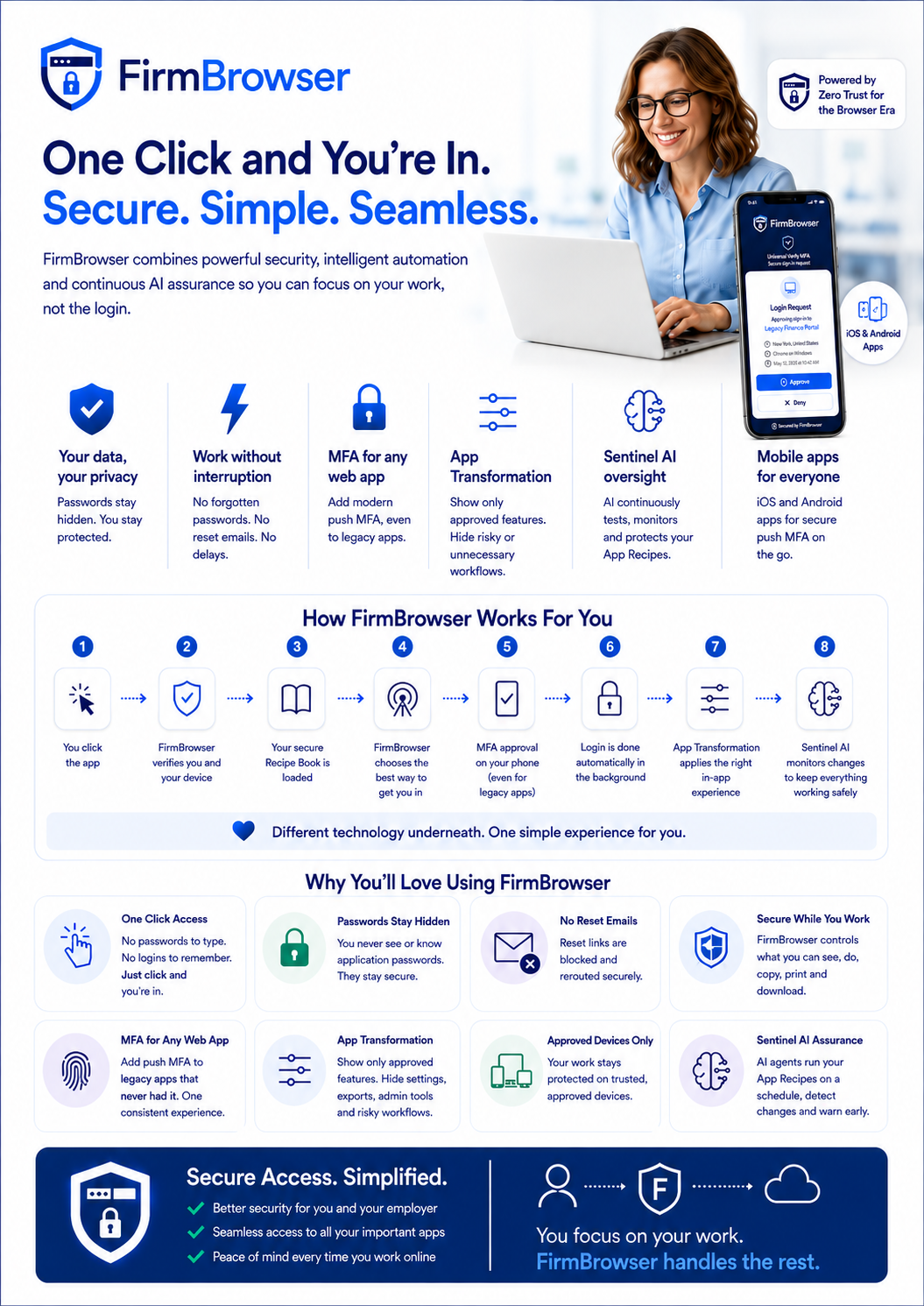
FirmBrowser for users — one click and you're in. Tap or click to view full size.
Who are you?
- Active Directory
- Microsoft Entra ID
- Okta
- Google Workspace / Google Identity
- Other SAML / OIDC providers
- Federated identity services
FirmBrowser is designed to work alongside these identity platforms. Vendor names are shown for architectural context only and do not imply partnership or endorsement.
How may you access and use this app?
Managed Browser + Secure Access Orchestration Layer
- Authentication orchestration
- Password isolation
- Managed browser
- App Transformation
- URL Rules
- Element Rules
- Table Rules
- Credential Lockdown
- Data movement controls
- Audit & session evidence
What can you actually do once inside?
FirmBrowser hands authentication to your approved identity provider, then continues applying browser and post-login controls.
FirmBrowser executes an authorised App Recipe so the user never needs to know, type or store the credential.
Keep your identity platform. Extend what it can control.
FirmBrowser orchestrates different authentication methods depending on the application. For the employee, the experience never changes: click the app, and FirmBrowser takes care of the rest.
One click for the user
The user clicks the app. FirmBrowser determines the correct authentication method and takes care of the rest.
Native SSO
Where an application supports your organisation's preferred identity provider, FirmBrowser launches the application and lets authentication be handled by that approved platform — Entra ID, Okta, Google Identity or another approved SAML/OIDC provider.
- Identity stays with your identity platform
- FirmBrowser continues browser and session controls
- Post-login policy still applies
Recipe-driven access
Where an application does not use your preferred SSO mechanism, FirmBrowser can use a secure App Recipe to perform the authorised login workflow on the user's behalf.
- The user never knows or types the password
- Nothing to copy, save, share or remember
- Same controls apply after login
Different authentication technologies underneath. One controlled experience for the user.
Where SSO ends, FirmBrowser begins.
One secure Recipe Book per user
FirmBrowser centrally governs the cloud applications each user is authorised to access. Every user receives a personalised Recipe Book containing the authorised application definitions and policies their role requires.
Central policy and governance
Role, group, device and access period
Authorised applications and their policies
Each with its own recipe and controls
Personalised Recipe Book · Approved device required
- Xero Recipe
- MYOB Recipe
- Practice Management Recipe
- Payroll Recipe
- Client Portal Recipe
- Banking Portal Recipe
Each application carries its own recipe and security policy — authentication method, credential reference, login steps, Universal Push MFA policy, App Transformation rules (Element, URL and Table), workflow restrictions, data-movement policy, audit requirements and the Sentinel AI monitoring schedule that continuously validates the recipe still works as intended.
Every app can have its own security recipe
An App Recipe is far more than a stored username and password.
Authentication
How the authorised user gets into the application — SSO hand-off or recipe execution.
Credentials
The secure credentials that application requires, referenced rather than revealed.
Login steps
Fields, buttons, navigation and conditional actions needed to authenticate, including MFA workflow where applicable.
Universal Push MFA
Whether this recipe requires a FirmBrowser push approval before authentication continues — even if the app has no native MFA.
App Transformation — URL Rules
Which URLs and form destinations may be changed, redirected or prevented.
App Transformation — Element Rules
Which buttons, menus, settings, links or functions may be hidden or removed.
App Transformation — Table Rules
Which columns, rows and values a role may see, with masking and conditional logic over the data itself.
Workflow rules
Which parts of the application this role is permitted to use.
Credential Lockdown
Controls that prevent a user recovering or resetting a credential outside FirmBrowser.
Audit
The events and policy actions that should be recorded for this application.
Sentinel AI assurance
The monitoring schedule Sentinel AI uses to execute this recipe, validate every step and report Recipe Health.
A library of pre-built, verified App Recipes
Browse an expanding library of recipes for the applications firms use every day — pre-built, tested and ready to assign in seconds. If an app isn't in the library, we build a recipe for it.
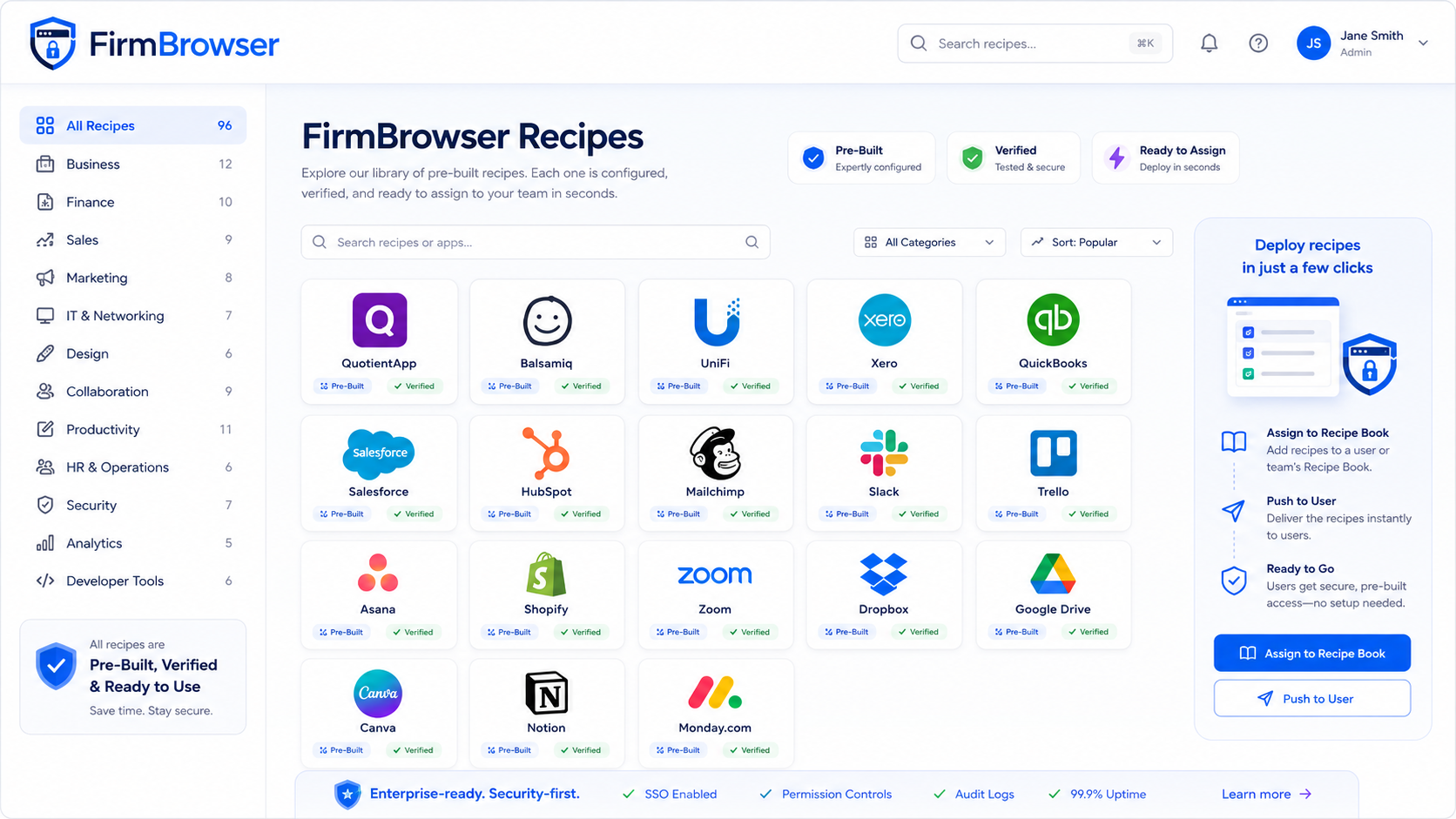
The FirmBrowser Recipe Library — pre-built, verified and ready to assign. Tap or click to view full size.
Any app your firm uses — if it isn't in the library, we can build a recipe for it.
Push MFA for any app.
Traditional MFA depends on the application vendor supporting it. FirmBrowser changes that. Native iOS and Android apps bring a modern push-approval step into FirmBrowser App Recipes — including legacy and specialist web applications with no native MFA capability.
- Add push MFA to applications that never supported it
- One approval experience across every App Recipe
- Configurable per Recipe — including alongside an app's own MFA
Universal Push MFA
Simple. Secure. Passwordless.
Login Request
Approve sign-in to QuotientApp?
- Brisbane, QLD, Australia
- FirmBrowser on Windows
- Today at 9:41 AM
Secured by FirmBrowser
Security no longer has to stop where the application's capabilities stop.
Change what users can do inside the app
Control does not stop when login succeeds. App Transformation is a four-part ecosystem — Element Rules, URL Rules, Table Rules and AI Intelligence — that reshapes the application's browser experience without requiring any change to the application itself.
Element Rules
Hide or remove buttons, menus, settings, exports and links so users see only what their role needs.
URL Rules
Control links and form destinations — block or redirect unauthorised routes and keep sessions inside approved workflows.
Table Rules
Hide columns and rows, apply filters and masking, and drive conditional logic over the data a user can see.
AI Intelligence
Detects the table and interface technology an application uses and auto-adjusts how rules are applied.
- Dashboard
- Reports
- Settings
- Users
- Admin
- Export
- Download
- Delete
- Change Password
- Billing
Every user sees every function the application ships with.
- Element Rules
- URL Rules
- Role Policy
- Dashboard
- Reports
- Approved Workflow
- Element Rule — Settings, Admin, Users removed
- URL Rule — password-reset route redirected
- Export — blocked
- Password Reset — restricted
Same cloud application. Different permitted experience.
Element Rules
Administrators identify page elements and apply policy to them — hide Settings, remove Administration and User Management, remove “Forgot Password” and Change Password, remove Export, disable Download, remove Print, hide Delete, remove “Switch Organisation”, hide billing controls and restrict sensitive workflows. The user sees only what their role requires.
Rules can be matched against stable identifiers such as element names, accessibility labels, semantic attributes, visible text, testing identifiers, IDs and CSS selectors — evaluated together so rules survive routine application changes.
Point. Click. Control.
URL Rules
URL Rules control where a browser-based application can go. Rules apply to links and form destinations, so FirmBrowser can reshape application navigation from the browser without requiring the SaaS vendor to modify its application.
- Redirect users away from unauthorised areas
- Enforce approved application paths
- Redirect legacy URLs
- Control tenant-specific navigation
- Block or replace password-reset routes
- Control sensitive form destinations
- Keep users inside an approved workflow
Table Rules
Tables are where the sensitive data lives. Table Rules hide columns and rows, apply filters and masking, and run conditional logic so each role only ever sees the records and values they are permitted to see — inside the application the firm already uses.
| Client | Matter | Fees | Salary | Bank account |
|---|---|---|---|---|
| Aurora Pty Ltd | Tax 2026 | $12,400 | $142,000 | •••• 4821 |
| Belmont Group | Audit | $31,900 | $168,500 | •••• 9042 |
| Carrow Family Trust | Advisory | $8,250 | $96,000 | •••• 1177 |
Every column, every row, every value — visible to everyone with access.
| Client | Matter | Fees | Salary |
|---|---|---|---|
| Aurora Pty Ltd | Tax 2026 | $12,400 | •••••• |
| Belmont Group | Audit | $31,900 | •••••• |
- Column Rule — Bank account removed
- Row Rule — records outside the user's portfolio filtered out
- Masking Rule — Salary values obscured
- Conditional logic — rules vary by role, group and access period
AI Intelligence
Every application builds its interface differently. FirmBrowser detects the table and interface technology an application uses and automatically adjusts its technical response, so transformations stay accurate and keep working as applications evolve.
Applications render data in very different ways. FirmBrowser detects the technology in use and adapts its technical response automatically, so Element, URL and Table Rules behave consistently and keep working as applications change.
Your web apps change. Sentinel AI watches.
Sentinel AI continuously exercises, analyses and validates your App Recipes — helping detect workflow changes, security concerns and failures before they affect your users.
Know before your users do.
Explore AI-powered app assuranceEvery Recipe carries its own monitoring schedule.
An agent executes the Recipe and observes every step.
AI explains whether a change actually matters.
Healthy, change detected, warning or failed — at a glance.
Hiding the password is only half the job
A security system can hide a password perfectly, but many SaaS applications still expose “Forgot password” and “Reset password”. If the reset email lands in the employee's inbox, the password-isolation model can be walked around in under a minute.
Without FirmBrowser
- Password hidden from the user
- User clicks “Forgot password”
- Reset email arrives in the user's inbox
- User creates a new password
With FirmBrowser Credential Lockdown
- Password hidden from the user
- Forgot-password UI removed by App Transformation Element Rules
- Reset URL controlled by App Transformation URL Rules
- Recovery email routed into a controlled workflow
App Transformation — Element Rules
Remove or hide Forgot Password, Change Password, account recovery, security settings and unauthorised authentication methods.
App Transformation — URL Rules
Block or redirect known credential-recovery URLs and the forms that submit to them.
Controlled credential rotation
Credentials can be changed through an approved FirmBrowser-controlled process rather than being exposed to users or administrators.
Mail Flow Re-Routing
Where the deployment architecture supports it, password-reset and credential-recovery messages can be diverted away from the user's normal mailbox.
Close the email reset back door
Many cloud applications use email as a credential-recovery mechanism. FirmBrowser can integrate with enterprise messaging controls so identified reset and recovery messages are diverted into a controlled security workflow instead of simply being handed to the user.
In Microsoft 365 environments this is architected around Exchange Online mail-flow controls, with Microsoft Graph used for automation and orchestration where appropriate. In Google Workspace it uses administrator-controlled Gmail routing mechanisms and the relevant administrative APIs. Availability depends on the deployment model and the controls your organisation enables.
More than a password manager
Traditional password managers primarily protect and fill credentials. FirmBrowser goes substantially further, because the browser environment itself is part of the security architecture.
The differentiator is not “we can fill passwords”. It is that FirmBrowser controls the environment in which those credentials and applications are used.
The browser is part of the security boundary
If credentials are going to be supplied automatically to sensitive cloud applications, the browser cannot be treated as an uncontrolled environment. FirmBrowser turns the browser from an unmanaged doorway into a controlled enterprise application-access environment.
Traditional browser
- Open environment
- User controls configuration
- User knows passwords
- Uncontrolled extensions
- Limited post-login governance
FirmBrowser
- Managed environment
- Enterprise-controlled configuration
- Passwords isolated from users
- Extensions centrally controlled
- Post-login app governance
- Audit and policy enforcement
- DevTools disabled
- Extensions centrally controlled
- FirmBrowser extension enforced
- Unauthorised extensions prevented
- Browser configuration centrally governed
- Credential viewing prevented
- Password-manager functionality restricted where required
- Approved-device policy
- Protected browser context
- Policies the user cannot simply change
What FirmBrowser protects
Eight practical controls that together turn the browser into a governed, defensible access layer.
Approved-device access
Helps stop critical cloud applications being accessed from unmanaged, personal or unauthorised devices.
Password isolation
Every cloud application gets a unique, complex password that is never known, typed or reused by the user.
Protected browser sessions
Protects sensitive browser work against screen scraping and keylogging risks where supported by the deployment model.
Role-based app access
Users only see and access the cloud applications they are authorised to use.
Automated login — hours back every week
Users tap in and go — no typing usernames, no hunting passwords, no MFA fumbling. Firms we've seen save over an hour a day for staff who juggle 10+ cloud apps, while removing the daily friction and login fatigue that quietly wears people down.
In-app workflow control
Modify or restrict risky workflows inside browser-based applications after login.
Data movement control
Controls copy, paste, downloads, exports and printing to reduce the risk of data leaving the browser.
Audit, visibility & session recording
Gives owners, partners, IT and compliance teams visibility over app usage, blocked actions and — where required — recorded sessions.
Effortless logins that give your staff over an hour back — every day.
Professional and financial firms live in ten, twenty, sometimes thirty browser-based apps a day. FirmBrowser's automated login takes users straight into the apps they're approved for — no typed usernames, no remembered passwords, no MFA prompt roulette. In the scenarios we've seen, that adds up to more than an hour saved per user per day, less support-desk noise, and a noticeable drop in the daily friction and fatigue that quietly wears people out.
saved per user, per day (observed)
opened without a single password typed
known, shared or remembered by staff
Built for professional and financial firms
Different industries, one shared security profile — client-data businesses, trust-based, compliance-sensitive, heavily reliant on cloud applications and distributed teams.
The browser is the new security perimeter.
For many professional and financial firms, the most important applications are no longer installed on the desktop. They are accessed through the browser. That means the browser is now where identity, passwords, client data, documents, reports, workflows and compliance risk meet. FirmBrowser is built around this reality.
Designed to support cyber governance and compliance evidence
FirmBrowser helps firms demonstrate stronger access control, session visibility, password governance, data handling controls and auditability across cloud applications.
Real-world access problems FirmBrowser is designed to solve
Illustrative scenarios drawn from common access challenges in professional and financial firms.
Offshore bookkeepers need access to tax and accounting apps, but partners do not want them knowing passwords or exporting client data.
Role-based access, hidden credentials, controlled browser session, copy/download restrictions and audit logs.
Temporary staff and paralegals need limited matter-system access, but cannot be allowed into admin settings, bulk exports or uncontrolled downloads.
Approved app access, workflow restrictions, session recording where required and evidence for compliance review.
Advisers access financial planning tools, investment platforms and identity documents from multiple locations.
Approved-device access, protected browser sessions, password isolation and improved visibility over application usage.
Contractors need short-term access to cloud systems, but the business needs to control what they can access, copy, print or export.
Time-bound access, role-based app visibility, data movement control and audit history.
Your identity platform secures the login.
FirmBrowser secures the browser experience around it.
Identity providers control who gets in. FirmBrowser controls how the app is accessed and what happens after login — passwords isolated, browser managed, navigation governed, risky functions removed, credential recovery closed and every access event auditable.
Your firm does not need more browser risk. It needs browser control.
FirmBrowser gives professional and financial firms a secure way to access, govern and audit the browser-based cloud applications they depend on.